As email spammers and scammers get sneakier, spam filters are getting smarter. That’s why most internet service providers and email companies use blacklists to help filter out unreliable or spammy senders.
Like most technology, email blacklists aren’t always perfect. Occasionally, legitimate senders might end up on a blacklist. This can be especially tricky for marketers and publishers with out-of-date email lists.
Not to worry, though—understanding how blacklists work can help you optimize your emails to pass through to the inbox every time.
What is a blacklist?
Blacklists—also known as denylists or blocklists—are real-time lists of email senders that are thought to be sources of spam or email abuse. Depending on the spammer’s severity, blacklisted messages may get blocked by ISPs or filtered straight to junk folders.
Unlike other types of spam filters that look at the content of an email, a blacklist examines the email list itself. There are hundreds of blacklists on the internet, and the most common way to end up on one is to receive a high volume of spam complaints.
Public blacklist providers use a combination of spam traps, spam complaints, and other data sources as criteria for adding a sender to a blocklist. Additionally, inbox providers also have internal blacklists that they use privately.
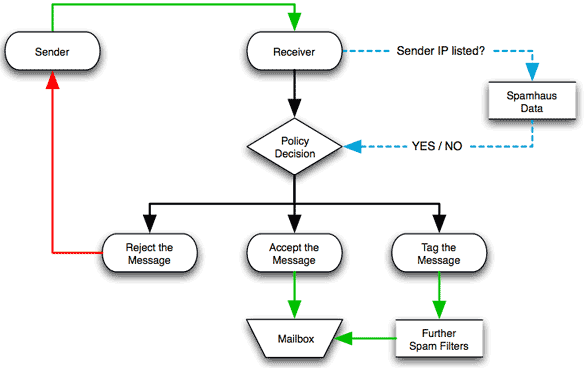
Most mail servers (like the one in your Gmail or yahoo inbox) are configured to automatically consult blacklists when they receive an email. The mail server searches the domain name system (DNS) for an IP address or domain name. This process dictates whether an email will hit the inbox, get filtered to spam, or bounce back to the sender.
Spamhaus, the operator of one of the biggest email blacklists on the web, created a graphic to illustrate the process:
Today, there are hundreds of public blacklist databases on the web. Here are some of the most common blacklists online:
- •Spamhaus Block List (SBL)
- •SpamCop Blocking List (SCBL)
- •Barracuda Reputation Block List (BRBL)
- •Spamhaus Domain Block List (DBL)
- •SURBL
- •Invaluement
- •URIBL
Why do legit email marketers sometimes end up on blacklists?
In their attempt to weed out spam emails, blacklists sometimes target messages from legitimate senders. If you’ve been placed on a blacklist, the most common reason is a bad source of subscriber data, spam complaints, or hitting a spam trap.
Some blacklists contain senders’ IP addresses, flagging any email that comes from an IP that’s been reported for spam in the past. This can be tricky for marketers and publishers using a shared IP, as they’ll share a reputation with other unaffiliated senders.
To find out if you’re on a blacklist, the Mxtoolbox blacklist checker lets you run your domain and IP address against 100+ common email blacklists. Or, you can use the Spamhaus Project’s email blacklist check.
Tip from the team at Paved:
Did you know that all Paved Marketplace publishers get free email blacklist monitoring + alerts?
Learn more.
Is email blacklist removal possible?
Yes, it's possible to get delisted from a blacklist with an appeal process.
With hundreds of blacklists on the web, a few false positives are inevitable. If you’re sending emails to opted-in contacts, you shouldn’t worry too much if you accidentally land on a blacklist. However, landing on a prominent blacklist may hurt your deliverability.
Fortunately, there are several steps you can take to remove yourself from an email blacklist:
- Ask the owner of the blacklist for a removal request. Be sure to comply with any instructions they give you, including their email best practices.
- Remove inactive subscribers, bounces, and any possible fake signups from your list.
- Follow good list hygiene practices to ensure that all contacts are fully opted in to receive your emails.
How can I avoid email blacklists in the first place?
The best way to prevent email blacklisting is to improve your list management and contact acquisition practices.
Here’s what we recommend:
- •Keep a clean list
If your list grows rapidly in a short amount of time—if you bought a list, for example—you might attract the attention of blacklist providers. It’s better to keep a clean, pruned list with opted-in subscribers only. Never email contacts that are scraped from the web, from 3rd-party sources, or purchased lists. - •Before you send emails, get clear permission from subscribers
Always use good opt-in practices for new list signups. Better yet, use double opt-in. When subscribers don’t expect to receive emails from you, they’re more likely to unsubscribe or report your content as spam. - •Send targeted, personalized email campaigns
When your email content is personalized for each subscriber, they know it’s for them. Great subject lines and effective CTAs can significantly improve engagement, which reduces spam complaints and bounce rates. - •Re-engage your contacts
If your email marketing metrics aren’t what they used to be, consider sending a re-engagement campaign to pique the interest of inactive subscribers. Reintroducing yourself can help avoid unnecessary spam complaints and unsubscribes. - •Authenticate your domain
If you send a lot of bulk emails, consider authenticating your email domain for an extra layer of credibility. According to Mailchimp, aligning your domain with DMARC, DKIM, and BIMI can improve deliverability and help messages land in inboxes. Plus, you'll get the coveted "verified" checkmark in Gmail.
Final thoughts
As ESPs and ISPs continue their fight against unreliable senders, there are a few things you can do to protect yourself from accidental blacklisting. Namely, solid list management and growth practices will help most email marketers steer clear of blacklists and spam folders.
Want even more tips for better email engagement and deliverability? Check out the Paved blog to learn more about how to improve your newsletter.